Learning how to make a building accessible starts with understanding that accessibility is more than adding a ramp near the entrance. People need to be able to park safely, reach the door, enter without trouble, move through hallways, use restrooms, reach counters, read signs, and leave safely during an emergency. Whether you own a business, manage a public space, remodel an office, or plan upgrades to an older property, accessibility should be reviewed early. When entrance routes, doors, bathrooms, flooring, lighting, signs, and emergency plans are considered from the start, the space becomes safer, easier to use, and more welcoming for everyone. The best accessible buildings are not only built to meet rules. They are designed around real people. A good plan looks at how someone actually moves through the property from arrival to exit, then removes barriers that may create confusion, discomfort, or safety risks.
What Does Building Accessibility Mean?
Building accessibility means people can enter, move through, and use a space safely and comfortably, regardless of physical ability, age, or mobility needs. It is not limited to ramps. A truly accessible building considers the full experience, from parking and entrances to hallways, restrooms, counters, signs, lighting, and emergency exits.
When learning how to make a building accessible, the goal is to remove barriers that make a space hard to use. These barriers may include steps at the entrance, narrow doorways, heavy doors, slippery floors, tight restroom layouts, poor lighting, confusing signs, or controls that are too high to reach.
Accessibility also means planning for different needs. Some people may use wheelchairs, walkers, canes, or strollers. Others may have limited vision, hearing loss, balance issues, temporary injuries, or difficulty reaching and gripping objects. A building becomes more accessible when these needs are considered before problems happen. The best accessible spaces feel natural to use. People should not have to search for a special entrance, ask for help opening a door, struggle to find a restroom, or feel unsafe while moving through the property. Good accessibility gives people more independence, dignity, and confidence when using the space.
Why Accessibility Matters for Safety, Comfort, and Legal Compliance
Accessibility matters because people should be able to use a building without unnecessary risk, frustration, or discomfort. A space that is hard to enter, difficult to move through, or unsafe to use can create problems for visitors, customers, employees, residents, and guests. Good accessibility helps more people feel welcome and gives them a safer way to use the property. Safety is one of the biggest reasons to make accessibility a priority. Uneven walkways, steep ramps, slippery floors, narrow paths, poor lighting, and hard-to-use doors can increase the risk of falls, injuries, and accidents. These issues can affect people using wheelchairs, walkers, canes, or strollers, as well as anyone with limited balance, strength, or vision. Comfort also matters. A building may technically be usable, but still feel stressful if people have to struggle to open doors, search for an accessible restroom, ask for help, or take a longer route than everyone else. When accessibility is planned well, the space feels easier, more natural, and more respectful to use. Legal compliance is another important reason to review accessibility early. Depending on the property type, project scope, location, and building use, accessibility rules may apply. Businesses, public spaces, commercial buildings, multifamily properties, and renovation projects may need to meet certain accessibility standards. Local building codes may have extra rules. When learning how to make a building accessible, it is smart to check the rules before starting construction or remodeling. Planning early can help avoid expensive changes, failed inspections, complaints, or barriers that could have been fixed during the design stage. The best approach is to combine code compliance with real-world usability so the building works better for everyone.
ADA, Local Codes, and Universal Design: What to Know First
Before starting an accessibility project, it is important to understand that not every building follows the same rules. The requirements can depend on the type of property, how the building is used, where it is located, and whether the project is new construction, a renovation, or a minor update to an existing space.
The ADA is one of the main accessibility laws used for many businesses, public spaces, and commercial properties. However, ADA rules are not the only thing to consider. State laws, local building codes, fire codes, zoning rules, and inspection requirements may also apply.
In some cases, local codes may require more than the minimum federal standard. That is why accessibility should be reviewed early in the planning process. If you wait until after construction starts, small design problems can become expensive to fix. Door widths, restroom layouts, ramp placement, hallway clearance, parking access, and emergency routes are much easier to plan correctly before walls, plumbing, and flooring are installed. Universal design is also important. While ADA and local codes focus on required standards, universal design focuses on making the space easier for more people to use in everyday life. This can include wider paths, easier door hardware, better lighting, clear signs, lower counters, slip-resistant flooring, and layouts that reduce confusion. When learning how to make a building accessible, the best approach is to combine legal compliance with real-world usability. Meeting the minimum rule may help with inspections, but a truly accessible building should also feel safe, simple, and comfortable for the people who use it every day. Before finalizing plans, property owners should confirm requirements with a qualified architect, contractor, accessibility consultant, or local code official.
Accessible Parking, Drop-Off Areas, and Exterior Routes
Accessible parking, drop-off areas, and exterior routes are the first parts of the building experience. Before someone reaches the front door, they need a safe, clear, and easy way to get there. When reviewing how to make a building accessible, start by asking whether a person can move from the parking lot, sidewalk, or drop-off area to the entrance without steps, steep slopes, blocked paths, rough pavement, or unsafe traffic areas. Accessible parking should be close to an accessible entrance and connected to a smooth route. The path should be wide enough to use comfortably. It should not force someone to travel behind parked cars, through puddles, over broken pavement, or across areas with poor visibility. Clear signs, good lighting, and a direct route can make the arrival experience safer for visitors, customers, employees, and residents. Drop-off areas should also be easy to use. A person should be able to exit a vehicle onto a stable surface and continue toward the entrance without having to step over a curb or navigate a crowded or confusing area. If there is a curb, a properly placed curb ramp can help connect the drop-off area to the walkway. Exterior routes should be firm, stable, and slip-resistant. Cracked sidewalks, loose gravel, uneven surfaces, steep slopes, narrow walkways, and raised edges can create barriers for people using wheelchairs, walkers, canes, or strollers. These issues can also increase the risk of falls among older adults and people with balance or vision concerns. For projects that must meet accessibility rules, details such as the number of accessible parking spaces, van-accessible spaces, access aisles, curb ramps, walkway width, slope, drainage, and signage should be checked against local code requirements. The goal is simple: people should be able to arrive, park, get dropped off, and reach the entrance safely and with as little difficulty as possible.
Retrofitting a Space? Prioritize the Biggest Wins First
Not every upgrade has the same impact. Get help prioritizing changes that improve access quickly—while staying realistic on budget and scopeEntrances, Doors, and Hardware
An accessible entrance should be easy to find, reach, and use. When reviewing how to make a building accessible, look beyond the doorway itself. A person should be able to approach the entrance, open the door, pass through safely, and continue inside without needing extra help.
The route to the entrance should be clear and stable. Steps, narrow landings, steep slopes, heavy doors, raised thresholds, and tight turning areas can make an entrance difficult to use.
Even if a building has an accessible parking space or ramp, the entrance may still create a barrier if the door is too narrow or there is not enough room to move. Door hardware is also important. Handles, locks, buzzers, keypads, card readers, and intercoms should be placed where people can reach them and should be simple to operate. Lever-style handles, push plates, automatic doors, and touchless entry systems can make access easier for people with limited hand strength, mobility challenges, or temporary injuries. A good entrance should not make someone feel like they are using a separate or hidden route. When possible, the accessible entrance should be the same main entrance everyone else uses. This creates a better experience and helps visitors, customers, residents, and employees feel welcome from the moment they arrive. For projects that must meet accessibility rules, door width, threshold height, maneuvering clearance, opening force, hardware type, and access control placement should be checked against local code requirements. The goal is simple: people should be able to enter the building safely, comfortably, and with dignity.
Hallways, Flooring, and Interior Movement
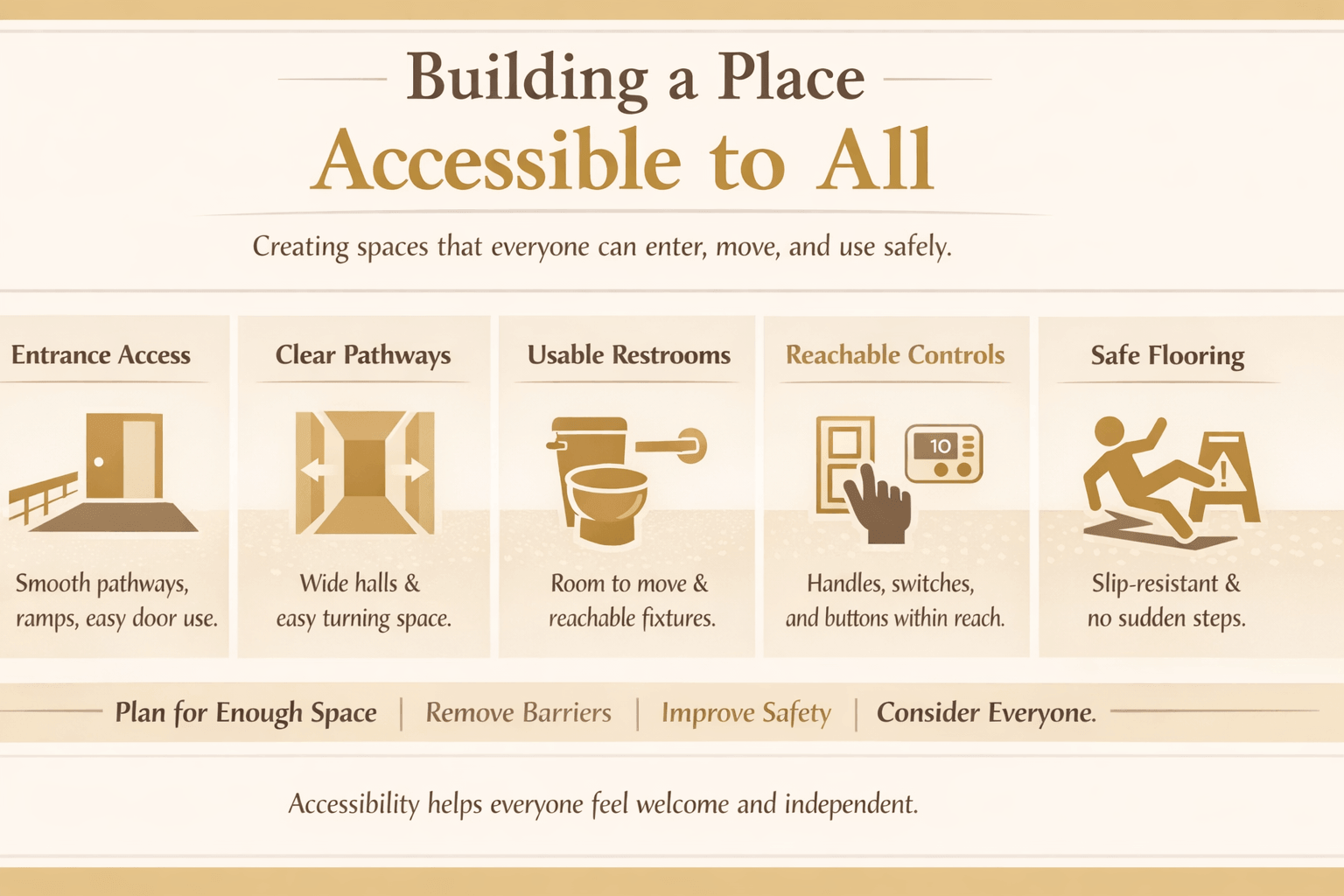 Accessibility does not stop at the entrance. Once people are inside the building, they need enough room to move safely from one area to another. When reviewing how to make a building accessible, look at hallways, room entrances, corners, flooring, furniture placement, and any areas where someone may need to turn or pass through. Hallways should feel open, clear, and easy to follow. Narrow paths, sharp turns, clutter, furniture, display racks, trash cans, and loose items can make movement difficult. A person using a wheelchair, walker, cane, or stroller should be able to move through common areas without getting stuck, backing up repeatedly, or needing someone to move objects out of the way. Flooring is also a major part of accessibility. Slippery surfaces, thick rugs, loose mats, uneven transitions, raised thresholds, cracked tile, and sudden level changes can create trip hazards. They can also make wheelchair and walker movement harder. Smooth, stable, slip-resistant flooring is usually safer and easier for more people to use. Interior movement should feel simple and predictable. People should be able to find key areas such as restrooms, elevators, service counters, meeting rooms, and exits without confusion. Clear pathways, good lighting, visible signs, and enough turning space can make the building easier to navigate. For projects that must meet accessibility rules, hallway width, turning space, doorway clearance, flooring transitions, ramped changes in level, and clear routes should be checked against local code requirements. The goal is to make the building’s interior safe, comfortable, and easy to navigate for everyone.
Accessible Restrooms and Changing Areas
Accessible restrooms should provide enough space for people to enter, move, turn, transfer, and use the fixtures safely. When reviewing how to make a building accessible, restrooms are among the most important areas to check, because even minor layout issues can make the space difficult or impossible for some people to use.
A restroom may look modern and clean, but still create barriers if the doorway is too narrow, the stall is too tight, the sink is hard to reach, or there is not enough room to turn. People using wheelchairs, walkers, canes, or other mobility aids need clear space to move without bumping into walls, doors, trash cans, or fixtures.
Grab bars, sinks, mirrors, soap dispensers, hand dryers, toilet paper holders, and door locks should be placed where people can reach and use them without strain. Fixtures should not require tight gripping, twisting, or awkward movement. Flooring should also be stable and slip-resistant to reduce the risk of falls. Changing areas should follow the same idea. A person should be able to enter, move around, sit if needed, reach hooks or shelves, and use the space privately and safely. Benches, mirrors, lockers, and storage areas should be placed where they are useful without blocking movement. For projects that must meet accessibility rules, restroom layout, turning space, stall size, grab bar placement, sink clearance, fixture height, door swing, and changing area requirements should be checked against local code standards. The goal is simple: restrooms and changing areas should be easy to enter, safe to use, and respectful of every person’s independence and dignity.
Kitchens, Break Rooms, and Service Counters
Kitchens, break rooms, and service counters should be easy to reach, enter, and use. When reviewing how to make a building accessible, look at whether people can move through the space, reach important features, and use counters, sinks, appliances, or service areas without strain. In shared kitchens and break rooms, at least one work area should be usable from a seated position. Sinks, counters, microwaves, refrigerators, cabinets, and storage areas should not be placed so high or so far back that some people cannot reach them. Clear floor space also matters because people using wheelchairs, walkers, or other mobility aids need room to approach and turn. Service counters should also be planned with accessibility in mind. A customer should be able to approach the counter, speak with staff, complete a transaction, sign paperwork, or use a payment device without difficulty. If the counter is too high, too deep, or blocked by displays, it may be hard for some people to use. Appliances, controls, faucets, handles, and payment devices should be simple to operate. Lever handles, front controls, pull-out shelves, drawer storage, and lower counter sections can make the space easier for more people to use. These details help people with limited reach, grip strength, balance, or mobility. For projects that must meet accessibility rules, counter height, knee clearance, sink approach, appliance placement, reach ranges, and clear floor space should be checked against local code requirements. The goal is to make kitchens, break rooms, and service counters useful, comfortable, and safe for everyone who needs them.
Signs, Lighting, and Wayfinding
Signs, lighting, and wayfinding help people understand where they are, where they need to go, and how to move through the building safely. When reviewing how to make a building accessible, do not focus only on ramps, doors, and restrooms. A building can still be difficult to use if people cannot find entrances, elevators, restrooms, service counters, exits, or important rooms.
Signs should be easy to see, read, and understand. Use simple words, clear symbols, strong contrast, and consistent placement. Important signs should not blend into the wall or be blocked by furniture, plants, displays, or open doors. In many buildings, tactile signs and Braille may also be needed for room identification and key access points.
Lighting is also important for accessibility. Poor lighting can make it harder to read signs, see floor changes, notice steps, recognize faces, or move safely through hallways and parking areas. Bright lighting is helpful, but glare can also create problems. The goal is steady, comfortable lighting that improves visibility without making the space harsh or difficult to use. Wayfinding should feel simple and predictable. People should be able to enter the building and quickly understand where to go next. Clear paths, visible signs, logical room numbers, readable maps, and consistent directions can reduce confusion and help visitors move with more confidence. For projects that must meet accessibility rules, sign placement, character size, tactile lettering, Braille, contrast, mounting height, lighting levels, and emergency signage should be checked against local code requirements. The goal is to help people navigate the building safely, independently, and without unnecessary confusion.
Emergency Access and Safe Exit Planning
Accessibility also matters during emergencies. When reviewing how to make a building accessible, consider how people would evacuate or get help during a fire, power outage, severe weather event, security issue, or other emergency. A safe building should not only be easy to enter. It should also have a clear plan for helping people exit or reach safety. Emergency routes should be easy to find, clearly marked, and free from clutter. Hallways, exits, stair areas, ramps, and exterior paths should not be blocked by furniture, storage, trash bins, displays, or locked doors. People need enough space to move safely, especially if they use wheelchairs, walkers, canes, or other mobility aids. Alarms and alerts should also work for different needs. Some people may not hear an audible alarm clearly, while others may not see a visual alert. Using both sound and visual signals can make emergency warnings more effective. Signs, lighting, and exit directions should be easy to see and understand, even during stressful situations. Some buildings may need areas of refuge, evacuation chairs, two-way communication systems, or staff procedures to help people who cannot use stairs or need extra time to exit. Staff should know what to do, where accessible exits are located, and how to offer help without creating confusion or panic. For projects that must meet accessibility rules, emergency exits, alarm systems, areas of refuge, stair access, evacuation plans, signage, and communication systems should be checked against local code and fire safety requirements. The goal is to make sure every person has a safer way to respond during an emergency.
Smart Technology That Can Improve Accessibility
Smart technology can make a building easier to use when it solves real access problems. When reviewing how to make a building accessible, technology should not replace good design, but it can support people who have limited reach, mobility challenges, vision concerns, hearing loss, or difficulty using standard controls. Automatic doors, touchless entry systems, video intercoms, and mobile access tools can make entrances easier to use. These features can help people who have trouble pulling heavy doors, reaching keypads, turning handles, or waiting outside for assistance. They can also improve access for people carrying items, pushing strollers, or using mobility aids.
Inside the building, smart lighting, voice-controlled systems, motion sensors, automatic faucets, hands-free soap dispensers, and adjustable thermostats can reduce the need to reach, grip, or twist. These tools can make common areas, restrooms, offices, and shared spaces easier and safer to use.
Digital wayfinding can also help. QR codes, mobile maps, screen-readable directories, and accessible kiosks can guide visitors to entrances, elevators, restrooms, service counters, and exits. However, digital tools should not be the only option. Some people may not use smartphones or may need clear physical signs, staff help, or printed directions. When considering how to make a building accessible, you need to check smart technology for its usability, reach, backup access, power failure concerns, privacy, and compatibility with assistive devices. The aim is to implement technology in a way that facilitates easier entry, navigation, and use of the building while avoiding the creation of new barriers.
Budgeting for Accessibility Improvements
Budgeting for accessibility improvements starts with understanding the size of the project. Some upgrades are simple, such as adding better signs, improving lighting, replacing door hardware, securing floor mats, or installing grab bars. Other improvements may cost more because they involve ramps, restroom remodeling, automatic doors, plumbing changes, electrical work, parking updates, or major layout changes. When reviewing how to make a building accessible, focus first on the barriers that affect safety and basic access. The most urgent items are usually the entrance route, parking access, door clearance, restroom usability, flooring hazards, lighting, and emergency exits. Fixing these areas first can make the biggest difference for visitors, customers, employees, and residents. Costs can vary depending on the type of building, where it’s located, labor costs, the materials used, any permits needed, and whether any walls, plumbing, or electrical systems need to be changed. A small accessibility update may be affordable, while a full restroom renovation or entrance redesign may require a larger budget. That is why it is smart to inspect the property, list the highest-priority barriers, and get estimates before starting work. Property owners should also plan for maintenance. Accessibility can get worse over time if doors become too heavy, signs are damaged, lights burn out, floor transitions loosen, or pathways become blocked. Keeping a small, ongoing budget for repairs and updates can help keep the building safer and easier to use. When considering how to make a building accessible, confirm the specific requirements before investing any money. Engaging a contractor, architect, accessibility consultant, or local code official can help identify necessary corrections and optional improvements to enhance access. The objective is to spend wisely, avoid costly redesigns, and focus on improving access in the most critical areas.
Common Accessibility Mistakes to Avoid
Many accessibility problems happen because small details are missed during planning, construction, or daily building maintenance. When learning how to make a building accessible, it is important to look beyond the obvious items and think about how people actually use the space.
One common mistake is assuming that a ramp solves everything. A ramp may help, but the building can still be hard to use if the parking area is poorly marked, the doorway is too narrow, the door is too heavy, or the route inside is blocked. Accessibility should be reviewed from arrival to exit, not just at the entrance.
Another mistake is creating an accessible route that is separate, hidden, or difficult to find. People should not have to go around the back of the building, use a service entrance, or ask staff for a special path unless there is no other practical option. The best accessible routes are clear, respectful, and easy to identify. Restrooms are also a common problem area. A restroom may have grab bars but still be difficult to use if there is not enough turning space, the sink is hard to reach, the door swings the wrong way, or trash cans and supplies block the clear floor area. Accessibility depends on the full layout, not one feature. Furniture and displays can also create barriers after a building is finished. Chairs, tables, merchandise racks, floor mats, signs, planters, and temporary storage can block hallways, entrances, restrooms, and emergency paths. A space that passed inspection can become harder to use if clear routes are not maintained. Another mistake is ignoring signs, lighting, and communication. People need to find entrances, elevators, restrooms, exits, and service areas without confusion. Poor lighting, low-contrast signs, unclear directions, or missing visual and audible alerts can make a building less safe and less welcoming. One of the biggest mistakes is delaying accessibility review until the project is almost complete. If you wait too long to understand how to make a building accessible, making necessary adjustments can become costly and disruptive. By addressing accessibility early in the process, you can avoid costly modifications and ensure the building is functional for everyone from the start.
Quick Accessibility Checklist for Property Owners
A quick accessibility review should focus on the areas people use most often. When checking how to make a building accessible, walk through the property the same way a visitor, customer, employee, or resident would use it. Start from the parking lot, sidewalk, or drop-off area, then move through the entrance, hallways, restrooms, service areas, and exits. First, check the arrival path. Make sure parking areas, sidewalks, ramps, and drop-off zones connect to a clear and stable route. Look for steps, steep slopes, cracked pavement, puddles, poor lighting, missing signs, or blocked paths that could make it harder for someone to reach the entrance. Next, review the entrance and doors. The main entrance should be easy to find and use. Doors shouldn’t be super heavy, too narrow, or a hassle to open. Stuff like handles, locks, buzzers, card readers, and keypads should be easy to grab and simple to use. Inside the building, check hallways, flooring, and room access. Walkways should stay clear of furniture, displays, trash cans, loose mats, storage boxes, and other obstacles. Flooring should be smooth, stable, and slip-resistant. People should be able to move, turn, and reach key areas without tight squeezes or unsafe transitions. Restrooms should be reviewed carefully. Check whether someone can enter, turn, use the toilet, reach the sink, operate fixtures, and exit without difficulty. Make sure grab bars, mirrors, soap dispensers, hand dryers, toilet paper holders, and trash cans are placed where they do not block movement. Also review service counters, signs, lighting, and emergency exits. Counters should include an area that is easier to reach and use. Signs should be clear, readable, and placed consistently. Lighting should help people see routes, floor changes, doors, and exits. Emergency paths should be visible, unlocked when required, and free from clutter. This checklist serves as a starting point for understanding how to make a building accessible. However, if your building needs to adhere to specific accessibility standards, you must verify the exact requirements with a qualified contractor, architect, accessibility consultant, or local code official before beginning any repairs or renovations.
Final Thoughts on How to Make a Building Accessible
Learning how to make a building accessible starts with looking at the full user experience, not just one feature. A ramp, wider door, or grab bar can help, but true accessibility means people can arrive, enter, move through the space, use important areas, and exit safely with less difficulty.
The best results come from planning accessibility early. Parking, entrances, hallways, restrooms, counters, signs, lighting, flooring, and emergency routes should all work together. When these details are handled before construction or remodeling begins, property owners can avoid costly changes and create a safer, more comfortable space.
Accessibility also needs ongoing attention. A building can become harder to use if pathways are blocked, lights stop working, signs are missing, doors become heavy, or flooring becomes damaged. Regular reviews help keep the space usable for visitors, customers, employees, residents, and guests. A building that is easier to access is better for everyone. It supports safety, dignity, independence, and comfort while helping property owners meet practical and legal responsibilities.
Frequently Asked Questions About How to Make a Building Accessible:
Can An Older Building Be Made Accessible Without A Full Remodel?
Yes. Many older buildings can be improved in stages. The best first steps are usually improving the entrance route, door access, restroom usability, signage, lighting, and flooring transitions. Larger changes may require permits or professional design help.
What Is The First Thing To Check When Making A Building Accessible?
Start with the path a visitor takes from the parking or the sidewalk to the entrance. If that route has steps, steep slopes, uneven pavement, narrow paths, or blocked access, the building may be difficult to use before someone even gets inside.
Do Small Businesses Need Accessible Restrooms?
Many businesses open to the public may have accessibility obligations, but the exact requirements depend on the building, business type, project scope, and local code. A business owner should confirm the rules before remodeling or assuming an older restroom is acceptable.
What Is The Most Overlooked Part Of Accessibility?
One overlooked issue is maneuvering space. A door, hallway, restroom, or counter may look accessible, but still be hard to use if a person cannot approach, turn, reach, or move safely.
How Often Should A Property Be Checked For Accessibility Problems?
Accessibility should be reviewed after renovations, layout changes, furniture changes, tenant changes, or user complaints. Regular maintenance matters because damaged flooring, heavy doors, poor lighting, and blocked routes can create new barriers over time.
This article about “How to Make a Building Accessible for Everyone” was updated on June 4th, 2026.